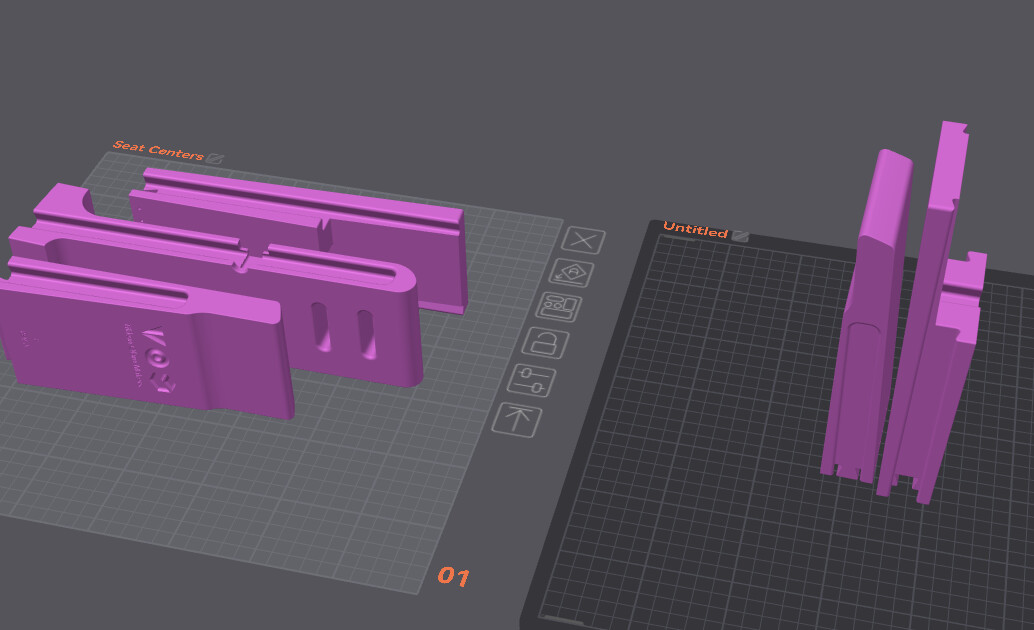
I’ll be starting the printing of the seat center pieces soon, and wondering about the printing orientation of these 3 pieces.
With the pieces laying on their side, the weak points will be the dovetail joints due to the layers being on the same plane as the joint. They would be much stronger if the pieces were rotated to print vertically. The attached screenshot shows the original orientation on the left, and the rotated version is on the right.
I just need clarification before I start the print on these pieces.
I would print them in the orientation they were in the file. There have been no reports of any issues with them that way. I have personally built and delivered 10 chairs with zero issues with any of the parts orientations.
When I open the downloaded files in Orca, all the settings are in it. The problem happens when I switch the printer. It uses the configurations for my printer instead of a Bambu. It pretty much changes everything. Supports, quality, strength, everything.
Yeah, I use Orca and non-Bambu as well. I make a copy of the file to convert. I open two copies of Orca, one with the original file and one with the version for my printers. I flip back and forth between the two files and go over every attribute to make sure nothing gets lost in translation. I also slice the original file and compare the sliced output with the slices for my printers. I make sure the same parts of the models are supported with the same type of support.